 VibeDesk
/Phone companion
Claude in your pocket.
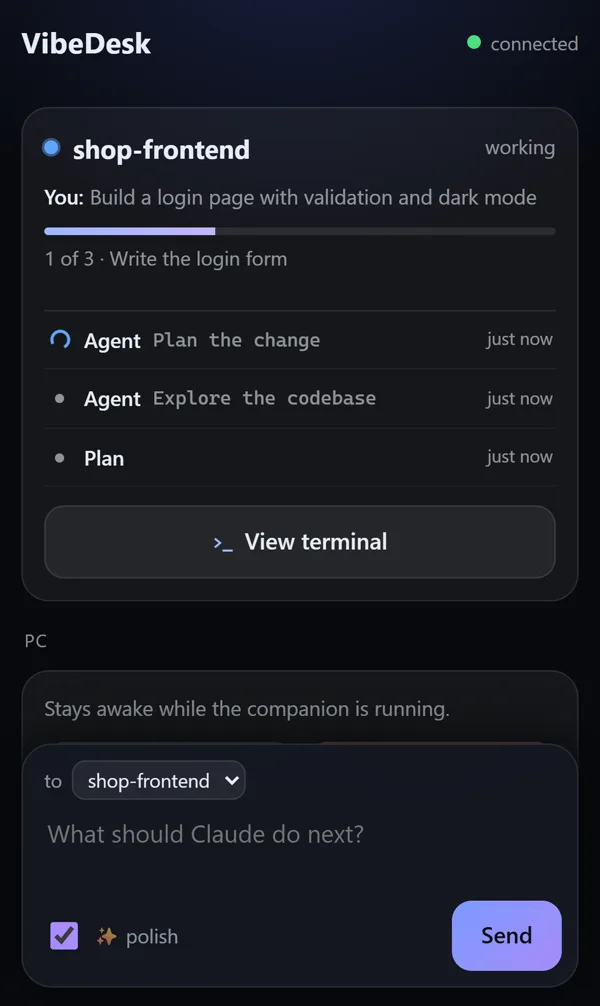
Open VibeDesk in your phone's browser. Answer approvals, see what every session is doing, follow the whole terminal live and send new tasks – from the sofa or on the go. No app to install.
Pairing
Scan, type six digits, done.
Switch on the phone companion, scan the QR code with your camera and enter the one-time code from the PC screen. That is all – no account, no router settings, no firewall rules.
- From anywhere – no app: VibeDesk sets up a secure HTTPS link through a Cloudflare quick tunnel, so it works on mobile data too. It is on by default once the companion runs and can be switched off.
- Without the code from your screen nobody gets in. Paired phones are listed on the PC and can be signed out one by one.
- While the companion runs, the PC does not go to sleep – you can put it to sleep or shut it down from the phone (with 60 seconds to cancel).
What is happening
More than “working” or “waiting”.
Every session shows your last prompt, the plan progress and Claude's latest steps – “Edits src/app.tsx”, “Command npm test” – with a checkmark, an error cross and the time. Notifications and watchdog messages arrive here too.
- Permission requests appear as cards with Allow, Always and Deny, and the phone vibrates.
- Type a rough idea and tick polish: Claude turns it into a clear prompt and sends it to the session you pick – or starts a new one. This runs on your Claude plan, no API key needed.
- When Claude is done, the phone suggests three sensible next steps. One tap sends one.
- Plans from plan mode arrive as a readable card: Let’s go or Change … with your feedback – your half-written text stays put while things update.
- With Claude Pro or Max you also see how much of your 5-hour limit is used.
Whole terminal
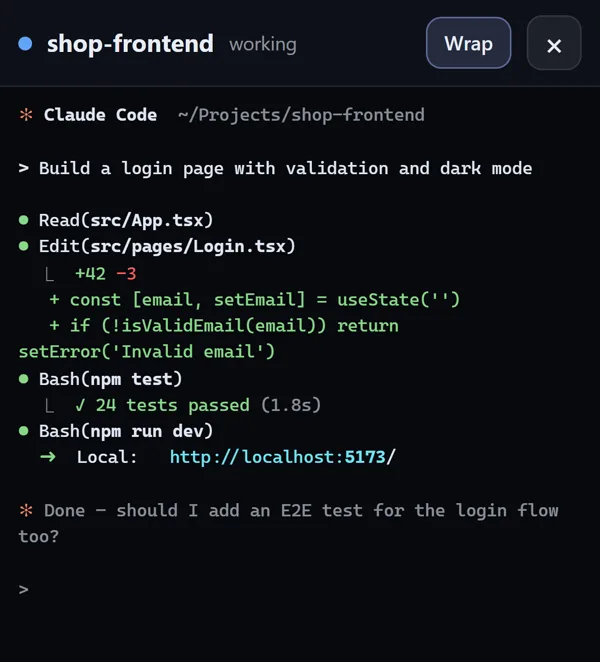
The complete terminal, live on your phone.
Turn on “Whole terminal on the phone” in the companion window and your phone shows the full terminal of a session – live, in color, with the whole history. It is off by default, because a terminal can contain secrets.
- Older lines load with a tap. If you read further up, nothing yanks you down; a New output button takes you back.
- Separator lines stay lines, long lines wrap – or switch wrapping off.
- Optional keys: turn on “Allow keys from the phone” and a bar with Esc ↑ ↓ 1 2 3 Enter appears – enough to answer Claude's menus or interrupt it. Free typing is deliberately not possible.
Privacy
Your phone, your PC, nobody in between.
Code from your screen
Every pairing needs a fresh 6-digit code that is only valid for a few minutes.
Key stays on the phone
The PC only stores a hash of each phone's key. Sign out single phones any time.
Off by default
The whole terminal and the keys each need their own switch on the PC.
Tunnel only while on
The Cloudflare link exists only while the companion runs. Prefer Wi-Fi only? Switch it off.
Streamer mode
The pairing code is blurred while you stream.
No VibeDesk server
Your phone talks to your PC directly or through the tunnel – there is no account and no cloud of ours.
Let Claude work.Step in when it counts.
FreeOpen source (MIT)Windows 10/11Uses your own Claude plan