 VibeDesk
/Guides
How to approve Claude Code permissions from your phone
Claude stops and asks “Run npm test?” – and you are on the sofa. What Claude Code offers out of the box, how the PermissionRequest hook works if you want to build your own, and the one-tap way on Windows.
What happens when Claude asks
Before a tool call that is not allowed yet – a shell command, a file edit, a web fetch – Claude Code pauses and shows a prompt in the terminal. Nothing moves until someone answers. Two hooks fire around that moment, and they do different jobs:
Notificationwith the matcherpermission_promptruns once the prompt has waited about six seconds. It can tell you, but not answer.PermissionRequestruns when Claude Code is about to ask. It can answer: whatever decision the hook prints on standard output is used instead of the terminal prompt.
So there are two ways to involve your phone: get notified and walk back to the PC, or carry the decision to the phone and back. Here are both, from built-in to do-it-yourself.
1. Built in: Remote Control
Claude Code can connect a session running on your PC to claude.ai/code and the Claude app for iOS and Android. Start a session with it switched on:
claude --remote-controlor type /remote-control (short: /rc) in a session that is already running. Scan the QR code with your phone, and the session opens in the Claude app. Claude keeps running on your PC the whole time; the phone is just another window into it, and permission prompts wait there until you answer.
For a buzz when Claude needs you, run /config and switch on Push when actions required.
Remote Control needs a Pro, Max, Team or Enterprise plan and a claude.ai login – API keys are not supported. On Team and Enterprise an owner has to enable it first. If you close the terminal, the session goes offline. Details in the official docs.
2. Just get told: a push via ntfy
If all you want is a ping on your phone, the free service ntfy is the quickest route. Install the ntfy app, subscribe to a topic with a long, random name, and add this to %USERPROFILE%\.claude\settings.json:
{
  "hooks": {
    "Notification": [
      {
        "matcher": "permission_prompt",
        "hooks": [ { "type": "command", "command": "curl.exe -s -d \"Claude Code needs your permission\" https://ntfy.sh/YOUR-LONG-RANDOM-TOPIC" } ]
      }
    ]
  }
}
curl.exe ships with Windows 10 and 11. Writing it with .exe matters: in Windows PowerShell, plain curl is a different command. Restart your Claude sessions so they pick up the hook.
On the public ntfy.sh server anyone who knows the topic name can read it – so pick a name nobody guesses and do not put secrets in the message. You still have to go to the PC to answer. Want the project name in the message? The notifications guide shows how to read it from the hook input.
3. Answer from the phone: the PermissionRequest hook
To actually decide on the phone, a PermissionRequest hook has to carry the question there and the answer back. The hook gets the request as JSON on standard input – the parts that matter:
{
  "hook_event_name": "PermissionRequest",
  "cwd": "C:\\Projects\\shop-frontend",
  "tool_name": "Bash",
  "tool_input": { "command": "npm test" },
  "permission_suggestions": [ … ]
}
To allow, the hook prints this on standard output and exits:
{ "hookSpecificOutput": { "hookEventName": "PermissionRequest", "decision": { "behavior": "allow" } } }To deny, use "behavior": "deny" and add a "message" – Claude reads it and can adjust its plan. Returning the permission_suggestions as "updatedPermissions" works like “don't ask again” in the terminal. If the hook prints nothing, Claude Code simply shows its usual prompt.
The tricky part is the round trip in between: the hook has to send the request to your phone, wait for a tap and return the result – and command hooks time out after 600 seconds by default. Open-source projects such as claude-remote-approver do this with ntfy notifications that have Approve and Deny buttons and fall back to the terminal prompt when nobody answers.
Whatever goes through a hosted push service passes through someone else's server, including the command text. For anything sensitive, self-host the push server or keep the round trip inside your own network.
4. Fewer prompts in the first place
The best prompt is the one you never get. Commands you always allow can go into the allow list, in the same settings.json:
{
  "permissions": {
    "allow": [ "Bash(npm test)", "Bash(npm run lint)" ]
  }
}
Keep the list short and specific. Anything that deletes, pushes or installs is worth a look on the phone.
5. Or one tap: VibeDesk
Full disclosure: this site belongs to VibeDesk, a free and open-source desktop for Claude Code on Windows. It runs the real Claude Code CLI and builds exactly this round trip on the PermissionRequest hook – without editing JSON:
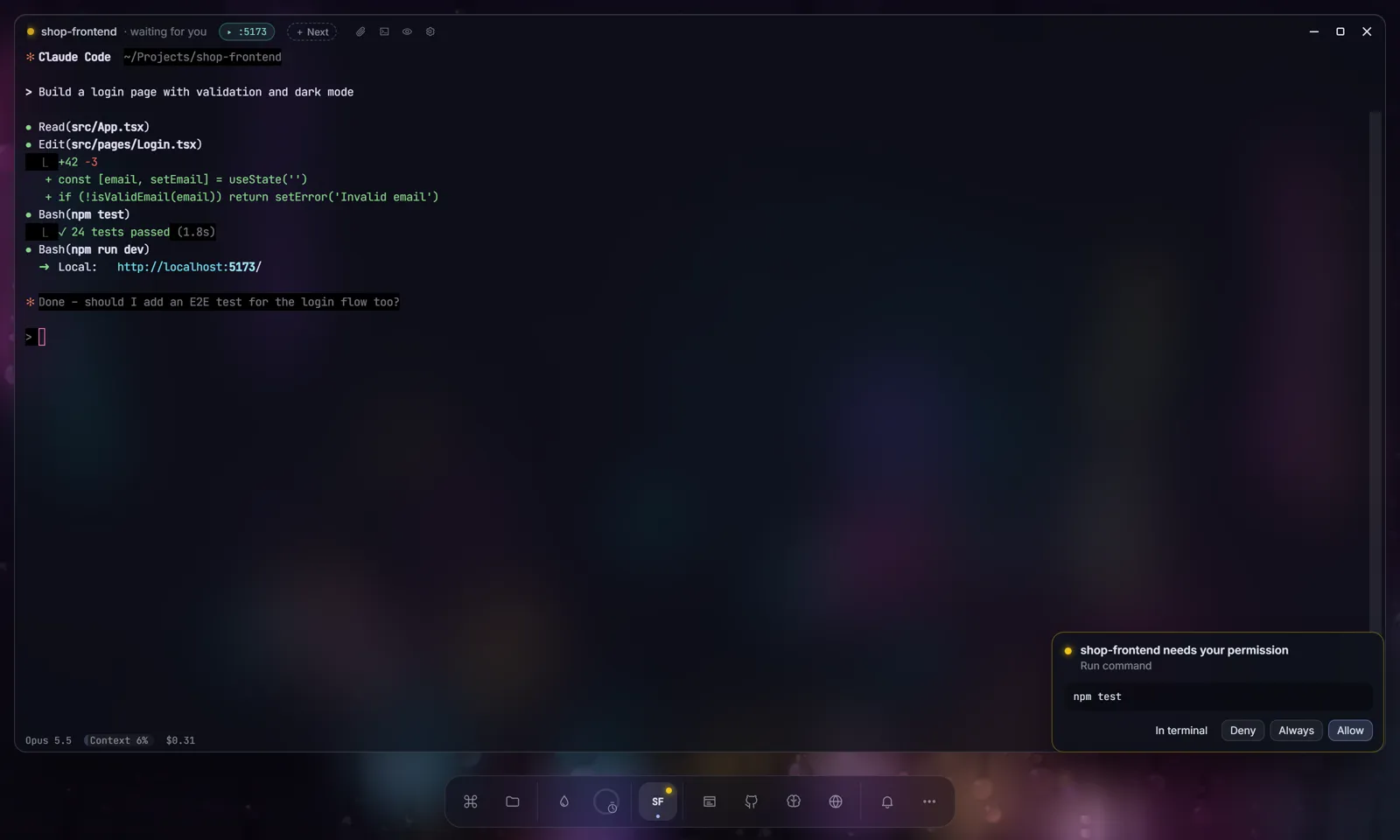
- A card instead of a prompt. When Claude asks, a card shows what it wants to do – “Run command:
npm test” – with Allow, Always and Deny, on the PC and on your phone at the same time. The phone vibrates. - Always appears when Claude Code suggests a rule for the request and saves that rule, like the terminal's own option. Deny tells Claude to ask what you want instead.
- The terminal still works. Answer there and the card disappears. “In terminal” on the desktop card hands the question back to the normal prompt, and after about ten minutes without an answer Claude asks there anyway.
- Plans, too. A plan from plan mode arrives as a readable card with Let's go or Change … plus your feedback.
- Pairing with a 6-digit code. Switch on the phone companion, scan the QR code and enter the one-time code from the PC screen. It is valid for five minutes and allows five tries. Each phone gets its own key, the PC stores only a hash of it, and you can sign out phones one by one.
- Wi-Fi or mobile data, no app. The phone opens VibeDesk in the browser. A Cloudflare quick tunnel is on by default so it works away from home too, and you can switch it off.
- Your settings stay yours. The hook comes from a temporary settings file that VibeDesk passes to each session it starts with
--settings. Your ownsettings.jsonis not touched, and because it is a plain hook it works with an API key as well as a subscription.
Coming in 2.0 on November 1: open approvals can also be answered right from the VibeDesk icon in the Windows notification area.
See the phone companion and sessions and approvals pages, or the 5-minute tour. Running several sessions? Read how to run several Claude Code sessions at once. Still choosing a setup? See the overview of Claude Code GUIs for Windows.
Checklist
- On a Pro or Max plan: try
claude --remote-controlfirst. - Just a ping: a
Notificationhook withpermission_promptand ntfy. - Decide on the phone: a
PermissionRequesthook that printsallowordeny. - Safe, frequent commands in the allow list.
- Read the command before you tap Allow.
Questions
Can I approve Claude Code permissions from my phone without extra tools?
Yes, with Remote Control. Start Claude Code with claude --remote-control (or type /remote-control in a running session) and open the session in the Claude app or at claude.ai/code. It needs a Pro, Max, Team or Enterprise plan; API keys are not supported, and the session on your PC has to keep running.
Which Claude Code hook can answer a permission prompt?
The PermissionRequest hook. It runs when Claude Code is about to ask you and can reply with a decision – allow or deny – as JSON on standard output. The Notification hook with the permission_prompt matcher can only tell you that Claude is waiting.
What happens if I do not answer on my phone?
If a PermissionRequest hook prints no decision, Claude Code shows its normal prompt in the terminal, so you can still answer at the PC. Command hooks time out after 600 seconds by default.
Is it safe to approve commands from a phone?
It is as safe as the channel in between. Read the command before you tap Allow, keep a public push topic long and random, and self-host the push server if commands may contain secrets. VibeDesk pairs each phone with a one-time 6-digit code from the PC screen and stores only a hash of the phone's key.
Let Claude work.Step in when it counts.
FreeOpen source (MIT)Windows 10/11Uses your own Claude plan